Topics
Your Billing page provides an overview of your credit balance, payment activity, and transaction history. Understanding what appears on this page helps you track usage and manage future purchases.
This article explains the types of information you may see on your Billing page and what each one represents.
Your Billing page displays your current credit balance.
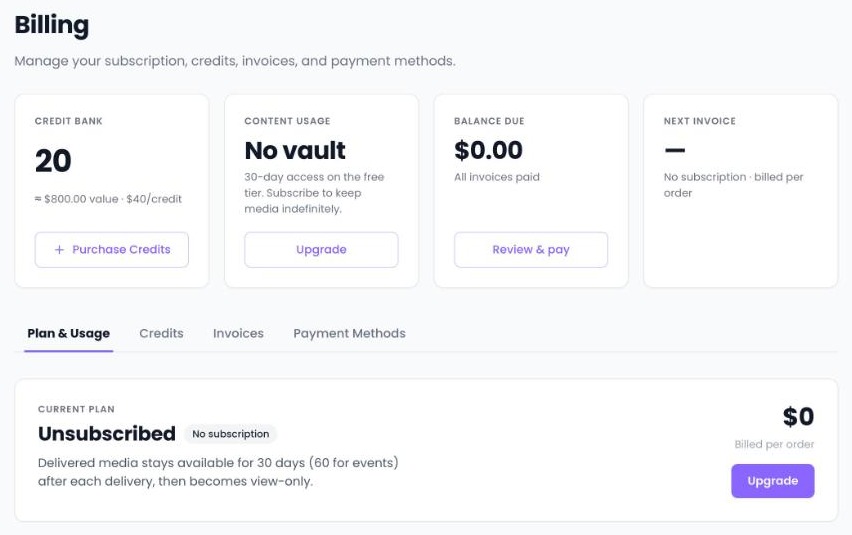
Your balance reflects:
When you place an order using credits, the balance updates automatically.
You may see a list of transactions that includes:
Each transaction represents an activity affecting your balance.

If you purchase credits directly, your Billing page may show:
Enterprise customers may see invoiced amounts instead of direct payment confirmations.
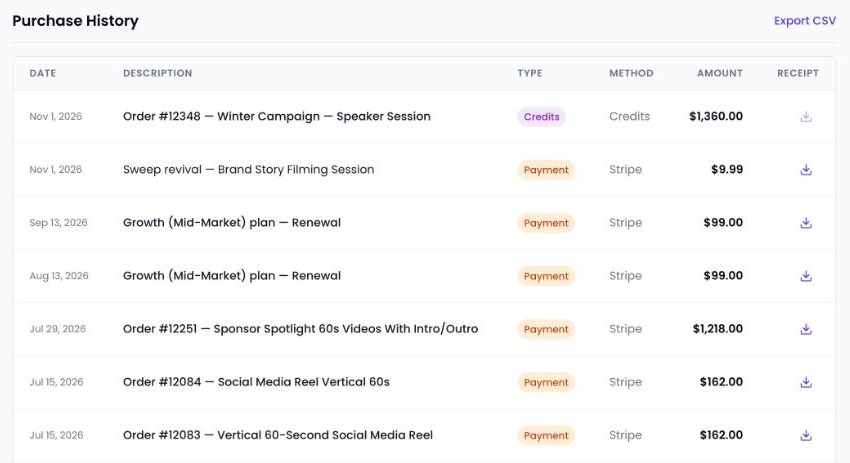
The credit balance or transaction list may change due to:
If something appears unexpected, review your recent transactions or contact Support.
As part of ongoing platform improvements, the layout and formatting of the Billing page may evolve. While the visual presentation may change, the core information displayed will continue to include:


